
With the multitude of institutions out there that are available for connections within the application, from time to time there may be some connectivity issues. Below are some troubleshooting steps you can follow to get those connections set up successfully.
Disconnect and Re-add the Institution: In some instances there may be a connection issue with the specific service your account initially made contact with. Many times disconnecting the institution and re-connecting can fix connectivity issues. To do so:
- Navigate to the My Money tab and click on the cog icon.
- Click into the institution you are hoping to disconnect.
- Select 'Disconnect Institution'
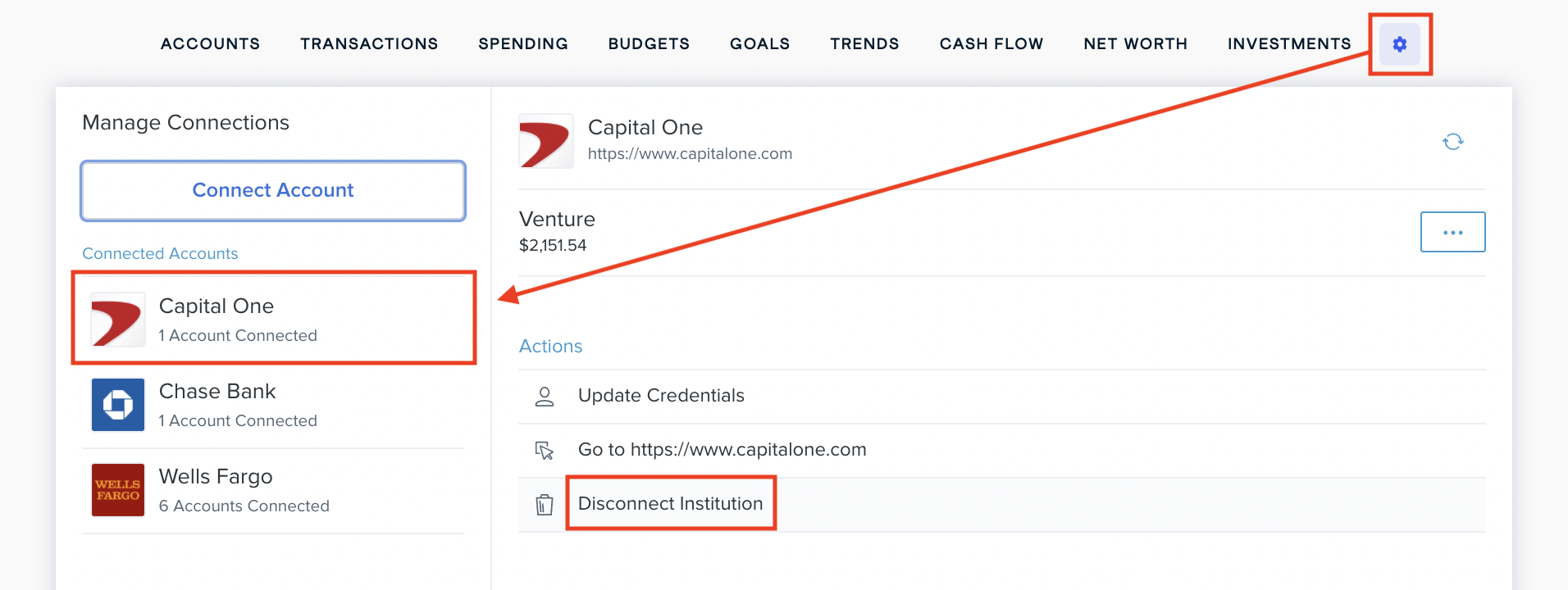
Once the institution is successfully disconnected, re-add it.
Resetting Security Questions: If you are asked to answer security questions and believe you are answering them correctly but are being denied follow the steps below:
- Log into the institution's website and verify the security question answer is correct.
- If the answers are correct but you are still being denied try changing the questions/answers on the institution's website.
- If you continue to have issues please contact us.
Multi-Factor Text/Calls not being sent: If you are supposed to receive a call/text to your phone to during login and are not receiving any message:
- Log into the institution's website and verify that the texts/calls are being sent when logging in there.
- If texts/calls are being sent when you log into the institution's website but not in the application, please contact us.
Multi-Factor Text/Calls being requested on a repeated basis: The length of time that an institution requires before asking for another Multi-Factor check is up to them. This can range from a few hours to a few days. Our service can't control how often you are asked for these additional steps. With some institutions you can disable Multi-Factor Authentication or change the authentication type.
Comments
0 comments
Please sign in to leave a comment.